Showing posts with label portable media. Show all posts

Thursday, June 3, 2010

Watching Grass Grow or Video Conversion


So you spent a truck load of cash to build the worlds most powerful home super computer but your not a gamer. You managed to convince your wife somehow you need this kind of power for touching up family pictures or creating that musical master piece. You won't be able to prove this me. The only other reason you need this kind of horsepower is for video conversion.

Express video conversion software MediaShow Espresso is for converting your videos for playback on your smart phone, iPhone, iPad, PSP, Xbox 360, on YouTube, and more.

I'm only going to write about how this new software is taking advantage of the capability of the investment you made making your PC a virtual super computer. Many of the other features available can be seen at the web site.
http://www.cyberlink.com/products/mediashow-espresso/overview_en_US.html

The software uses multi core CPU's processing muscle to transcode videos. Support for multi-threading allows MediaShow Espresso to utilize up to 4 processing cores at once.

They also utilize the stream processors in your GPU to convert your videos faster than ever with optimization for hardware acceleration technologies from Intel® Core™ i3, i5, and i7; NVIDIA® CUDA™; and ATI® Stream™.

CyberLink is leveraging ATI's Unified Video Decoder (UVD) in its MediaShow Espresso video converter application. This allows it to quickly convert digital video files for use on portable devices like Apple's iPhone and Sony PSP. CyberLink has also optimized its PowerDirector 7 video editing software to take advantage of ATI Stream.

Tests conducted by ATI showed a reduction in transcoding time of at least 50% in most applications. For example, a 94 second 1920x1080 video encoded at 24 frames per second using H.264 took 131 seconds to transcode to a format suitable for the iPhone using just the CPU. It took just 46 seconds using a mid-range Radeon HD 4670 video card, reducing the time needed by almost 65%. Results would be even more dramatic using a higher end Radeon 4870 or Radeon 4890 GPU. Addition GPUs through CrossFire would provide even greater performance improvements.

So at $40 this might not be High Tech on a Budget but with $1000 dollars or more into a high end system this by comparison not only makes good sense but it is a steal.

Monday, March 22, 2010

What Dreams May Become - Make your own Iphone and Droid Apps

http://www.appcelerator.com/

We all have that one idea that we hold on to because we are affraid it will get stolen yet it will never hit the market because we don't have the skills to build it. You still likely don't have the skills but this might be your chance to give it a try without having to be a expert programmer.

This is free with free community support or you can get better support packages for a fee.


Titanium makes cross-platform native application development easy.

A free and open source application development platform, Titanium let’s you create native mobile and desktop application experiences using existing web skills like Javascript, HTML, CSS, Python, Ruby, and PHP. Learn More.


Rich Multimedia

Titanium offers music, photo and video streaming/storing on a user’s device as well as custom video playback controls.

Flexible Storage: Filesystem, Database On Device

Store user preferences, save data files, or implement the mobile version of a cookie using SQL Lite and the iPhone / Android’s native file system.

Unlimited Extensibility

Titanium’s plug-in architecture allows you code modules in Objective-C or Java to extend your mobile app with custom native functionality and then call those modules using Javascript in Titanium.

Your Best Shot: Access the Camera or Video Camera

Snap a photo or video, store it on the phone, and push it to Flickr, Youtube, or your website.

Cloud-Connected Apps

RESTful web services are easy to tap into with Titanium. We’ve also included a full SOAP client for making SOAP API requests. And we’ve bundled in support for over 300 APIs via Yahoo YQL.

Code like it’s the year 2020: HTML5 and CSS3 support

Built on top of the latest Webkit rendering engine, Titanium lets you develop advanced animations and sophisticated interface


You can also check out this site that is iphone only:
http://gamesalad.com/products/creator

Saturday, March 29, 2008

What? Can You Repeat That?


Im a podcast Junky but I can't hear very well. I had a several explosions go off very close to me while in the Marines and lost about 50% of my hearing in one ear. This doesn't help that fact that men tend to loose hearing as they get older. This is a natural defensive mechanism.


Anyways I ran across a program that can help.


Tired of reaching for your volume knob every time your mp3 player changes to a new song?MP3Gain analyzes and adjusts mp3 files so that they have the same volume.
MP3Gain does not just do peak normalization, as many normalizers do. Instead, it does some statistical analysis to determine how loud the file actually sounds to the human ear.Also, the changes MP3Gain makes are completely lossless. There is no quality lost in the change because the program adjusts the mp3 file directly, without decoding and re-encoding.
Think about ways to get better audio levels out of movie audio tracks. I will experiment with this and post more later.

Thursday, February 28, 2008

Don't Let Itunes hold you hostage anymore.


http://www.floola.com/modules/wiwimod/

What I hate about the Ipod is Itunes. If I was the only one we wouldn't have Floola.

Floola is a freeware application to efficiently manage your iPod or your Motorola mobile phone (any model supporting iTunes).


It's a standalone application that can be run directly from your iPod and needs no installation under Linux, Mac OS X and Windows (Windows Vista is supported).Floola supports all common used iPod features including artwork, podcasts and smart playlists! It's also able to convert audio or video incompatible with the iPod so that you can copy almost any file to it. It even allows adding youtube and myspace videos just entering the page url!


It's a standalone application that can be run directly from your iPod and needs no installation under Linux, Mac OS X and Windows (Windows Vista is supported).Floola supports all common used iPod features including artwork, podcasts and smart playlists! It's also able to convert audio or video incompatible with the iPod so that you can copy almost any file to it. It even allows adding youtube and myspace videos just entering the page url!

Check out the features. Simply fun, simply free, simply Floola.

Tuesday, January 8, 2008

Penny Wise Pound Wise

Have you ever moved a large book collection?
These are free audio books read by volunteers. There are over 1000 titles available.

"No two people read the same book."
Edmund Wilson


http://librivox.org/

Listen

LibriVox provides free audiobooks from the public domain.
OGG and MP3 formated audio books .... FREE

LibriVox Books Podcast

Monday, January 7, 2008

Not for the Mentally Challenged


Over 1000 free audio books and video downloads

For the Geek

Gettysburg Address
Speech by Gandhi

I Have a Dream
by Martin Luther King, Jr.

Extraordinary Leadership
by Robin Sharma

The Mercury Theatre on the Air
by Orson Welles

The Road Less Traveled
by Robert Frost

Self Reliance
by Ralph Waldo Emerson

Law of Attraction and Relationships
by Pramod Uday

Extra Tips for The FG to Maximizing Your Money
by Peter Bielagus

Answering the Question: What is Enlightenment?
by Immanuel Kant

You will never know unless you listen.

Sunday, January 6, 2008

Same Old Story, Whole New Audiance

OLD Time Radio on a High Tech Budget

I recently saw a CD collection of old time radio shows at a price that would have me eating cat food when I retire. So I decided to search the internet for some free resources. It was like digging up buried treasure.

Remember when humor required creativity and imagination? Before the age of the Monster HD TVs and ipod nanos there was OTR (old time radio). I am providing a list of links to websites hosting OTR broadcasts in mostly MP3 formats.

These were the days of the great story tellers when an entire cast of voice actors and sound men attempted to control your imagination. Next time you take that family road trip put on some old time radio and let your kids experience and enjoy comedy, creativity, and story telling the way their grandparents did. My sons loved the Isaac Asimov and Ray Bradbury Sci Fi.


RadioLovers
Radio Days
Wisconsin Public Radio
Old Time Radio - Free OTR Show Downloads
Flick Lives
Shep Archives
http://www.oldtimeradiofans.com/
http://www.otrcat.com/

itunes:

Old Time Radio Rides Again!
Radio Memories
Vintage Radio Shows.com
botar’s old time radio

Is it Legal? In short YES.

why most OTR shows are not copyrighted

Tuesday, December 25, 2007

Its a Bird, Its a Plane, No its Super

SUPER © Simplified Universal Player Encoder & Renderer. - FREE
This really is a sweet front end for media conversion
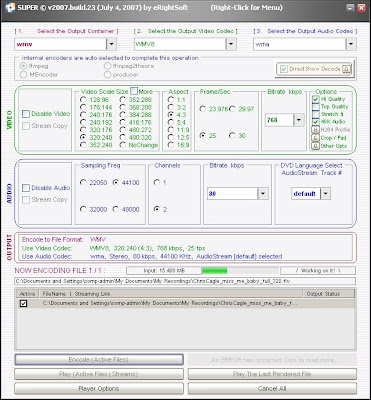


Here we go again. Why yet another media encoder front end? Simple, this GUI allows us to take those FLV flash files and convert them to whatever format we want.

Not really, I wanted WMV which it wouldn't convert for me without generating a error. But who cares. I made a MPEG from a FLV that was nearly perfect and the converstion was insanely simple and fast. It uses a combination of ffmpeg and mplayer codecs to get the job done.

Finding the download link isn't so simple and fast, so here it is.
http://www.erightsoft.net/Superdc.html
From the eRightSoft main page it actually is simple to locate.



A GUI to ffmpeg, MEncoder, mplayer, x264, mppenc, ffmpeg2theora & the theora/vorbis RealProducer plugIn. If you need a simple, yet very efficient tool to convert (encode) or play any Multimedia file, without reading manuals or spending long hours training, then SUPER © is all you need. It is a Multimedia Encoder and a Multimedia Player, easy-to-use with 1 simple click.

Here is the list from the Super site, it almost seems like a bad infomercial:

SUPER © IS UNIVERSAL as it supports a wide variety of input/source file format to playor encode (to & from) without any additional third party software. Supported input source file formats are:

- Video format: 3gp/3g2(Nokia,Siemens,Sony,Ericsson) asf, avi (DivX,H263,H263+,H264,XviD,MPEG4,MSmpeg4 etc..), dat, fli, flc, flv (used in Flash), mkv, mpg (Mpeg I,Mpeg II), mov(H263,H263+,H264,MPEG4 etc..), mp4(H263,H263+,H264,MPEG4), ogg, qt, rm, ram, rmvb, str (Play Station), swf (Flash), ts (HDTV), viv, vob, wmv

- Audio format: aac, ac3, amr, mmf, mp2, mp3, mp4, mpc, ogg, ra, wav, wma- AviSynth Script Files: avs. Let you specify advanced encoding commands using AviSynth scripts!
SUPER © supports the conversion (encoding both ways, to & from ) of ALL the listed formats.

To list few examples:
drag & drop any Audio file or even any VIDEO file and EXTRACT the AUDIO part by converting it toaac, ac3, amr_nb (for ring tones), amr_wb, mmf (for ring tones), mp2, mp3, mpc (MusePack), ogg, wav, wma formats.
* Mobile phone 3GP converter Convert any input video format to 3GP. Convert a 3GP file to any other video format.
* Mobile phone 3G2 converter Convert any input video format to 3G2. Convert a 3G2 file to any other video format.
* PocketPC converter Convert any input video format to a PocketPC file. Convert a PocketPC file to any other video format.
* iPod & iPod 5.5G converter Convert any input video format to an iPod/5.5G file. Convert an iPod/5.5G file to any other video format.The rendered iPod/5.5G files are created using the most advanced video codecs H.264/AVC and MPEG-4 format.To copy a DVD (that you legally purchased) into a valid iPod/5.5G format, we recommend that you also use the bestavailable DVDDecrypter to decrypt the entire DVD and copy the VOB files to your HardDisk in order to encodethem with SUPER ©. Note that DVDDecrypter is also a Freeware.
* PS3 & PSP converter Convert any input video format to a PS3/PSP file. Convert a PS3/PSP file to any other video format.The rendered PS3/PSP files are created using the most advanced video codecs H.264/AVC and MPEG-4 format.To copy a DVD (that you legally purchased) into a valid PS3/PSP format, we recommend that you also use the bestavailable DVDDecrypter to decrypt the entire DVD and copy the VOB files to your HardDisk in order to encodethem with SUPER ©. Note that DVDDecrypter is also a Freeware.
* Zune converter Convert any input video format to a Zune file. Convert a Zune file to any other video format.The rendered Zune files are created using a fully compatible WMV7/8 and WMA format.To copy a DVD (that you legally purchased) into a valid Zune format, we recommend that you also use the bestavailable DVDDecrypter to decrypt the entire DVD and copy the VOB files to your HardDisk in order to encodethem with SUPER ©. Note that DVDDecrypter is also a Freeware.
* Nintendo DS converter Convert any input video format to a Nintendo DS file. (.dpg)The rendered Nintendo DS files are created using a fully compatible DPG format.To copy a DVD (that you legally purchased) into a valid Nintendo DS format, we recommend that you also use the bestavailable DVDDecrypter to decrypt the entire DVD and copy the VOB files to your HardDisk in order to encodethem with SUPER ©. Note that DVDDecrypter is also a Freeware.
* VCD converter Convert any input video format to MPG-VCD. Convert an MPG-VCD file to any other video format.The rendered MPG files are VCD-standard strictly compliant and "NERO burning" compatible. They are seamlesslyaccepted by NERO to burn without any additional process and produce a CD playable on most stand alone players.
* SVCD converter Convert any input video format to MPG-SVCD. Convert an MPG-SVCD file to any other video format.The rendered MPG files are SVCD-standard strictly compliant and "NERO burning" compatible. They are seamlesslyaccepted by NERO to burn without any additional process and produce a CD playable on most stand alone players.
* DVD converter
Convert any input video format to VOB-DVD. Convert a VOB-DVD file to any other video format.The rendered VOB files are DVD-standard strictly compliant and "TMPGEnc DVD Author" compatible. They areseamlessly accepted by the "TMPGEnc DVD Author" which will add the necessary Menu, create theadditional .bup and .ifo files, rename/split the rendered VOB file to Vts_xx_x.vob before burning to DVD.
* AVI converter
Convert any input video format to AVI. Convert an AVI file to any other video format.The rendered AVI files are created using a wide variety of codecs H.264/MPEG-4/DivX/XviD/H.263... togetherwith AAC, ac3, mp3, mp2 or wav audio.
MP4 converter Convert any input video format to MP4. Convert an MP4 file to any other video format.The rendered MP4 files are created using a wide variety of codecs H.264/MPEG-4/DivX/XviD/H.263... togetherwith AAC, AMR, wav audio. They are fully playable on QuickTime7.
* MOV converter Convert any input video format to MOV. Convert a MOV file to any other video format.The rendered MOV files are created using a wide variety of codecs H.264/MPEG-4/DivX/XviD/H.263... togetherwith AAC, AMR, wav audio. They are fully playable on QuickTime7.
* ASF converter Convert any input video format to ASF. Convert an ASF file to any other video format.
* FLV converter Convert any input video format to FLV. Convert an FLV file to any other video format.
* MPG converter Convert any input video format to MPG. Convert an MPG file to any other video format.
* OGG converter Convert any input video format to OGG. Convert an OGG file to any other video format.
* WMV converter Convert any input video format to WMV. Convert a WMV file to any other video format.
* GIF converter Convert any input video format to Animated GIF format.
convert AviSynth script files (.AVS) to any other video format.
convert VCD (.DAT) files to any other format. (Also with Lossless Direct Conversion to MPG VCD-Compliant )
* convert Flash (.FLV) files (similar to Google/YouTube video) to any other format.
* convert Matroska (.MKV) files to any other format.
* convert QuickTime (.QT) files to any other format.
* convert RealMedia (.RM .RAM .RMVB .RA) files to any other format.
* convert Old.Play.Station (.STR) files to any other format.
* convert ShockWave Flash (.SWF) files containing FLV video codec to any other format.
* convert HDTV (.TS) files to any other format. (Also with Lossless Direct Conversion To VOB)
* convert VivoActive (.VIV) files to any other format.
* AutoMode to convert any type of video to VCD, SVCD, DVD.
* "Direct Stream Copy" mode to render exact quality when the same video/audio codecs of the source file are to be used in the output file.
* Play all of the above file formats with SUPER ©
* Play or Save on your Disk the Internet Media Streams like: mms:// rtsp:// http://
* Play Images (bmp, dib, fax, jpg, png, rle, tif, wmf) using Win2K/XP Microsoft(R) resources.

Thursday, December 6, 2007

No Fuss, No Muss, or should I say mess.

(potentially not work safe!!!)


http://www.videocodezone.com/

(potentially not work safe!!!)


Online Tools Convert And Download Your Favorite Videos (For Free!!!)


VideoCodeZone and other similiar services
(some listed below) work by entering a URL for the FLASH or MEDIA or browsing to a file on you PC. Then like your toaster you simply push the button and wait. Some of these services notify you by email when they are done with the conversion process.

Home Video Conversion and Download
Convert and download videos from popular websites without installing any software.

These services allows you to download and convert videos to many popular formats available today. Some of these sites also allow you to browse videos converted by other which could be in conflict with your employers code of conduct.

This is a online flash video converter where you copy and paste the URL of the video, select the output format and click the Convert/Download button.

You can also convert any flash video from your own files as well. Select the file and click the Convert/Download button.

Other sites:
http://online.movavi.com/
http://vixy.net/
http://www.flvix.com/ - not work safe
http://media-convert.com/
http://www.zamzar.com/

http://www.all2convert.com/index.html - choose your poison (very simple interface)


http://mux.am/

http://heywatch.com/page/home - registration required (supports Adobe Flash 9 H.264)

Tuesday, November 27, 2007

Baby Steps - A simpler way to convert video for portable devices


Videora Converter - FREE (no skill required)
http://www.videora.com/en-us/Converter/

"It allows you to convert your regular PC video files (avi, mpeg, etc) into the proper video format that your mobile or fixed video device understands. Each version is tailored specifically to the device in question."

This is a suite of applications specifically tuned to the device you want to create video for. So there is a seperate download for each application depending on your device.

This covers the IPOD, IPhone, PSP, XBox 360, Tivo, and PMP.


For more advanced options and in many cases better quality results, check out my post for MPLAYER and the MeWiG GUI (some PC skill required)
http://thinkbiggar.blogspot.com/2007/10/get-it-while-it-lasts-powerful-media.html

Monday, November 19, 2007

Life comes full circle - ORB personal media broadcasting - FREE


Broadcast your movies, TV, and other media content anywhere for FREE.

What VLC does ORB does well and is easy to setup. ORB is dependent on a Streaming media source to make it work.

The Orb application is free. There are no fees for MyCasting. You need a home pc to get setup, and can use any web-enabled media player with streaming capabilities to remotely play the media. VLC is a good start.

Your computer broadcasts the media you choose that is stored on your PC. You can stream content through any internet device. This works with mobile phones, PDAs, laptops or any other computer.

There is no software installation required on the receiving web device. You can broadcast photos, music, videos, and even live TV. You can use this to view documents as well.

ORB instructions and recommendations.


Download:
http://corp.orb.com/download_orb

Monday, November 12, 2007

Free iPod Video Converter


http://www.ipod-video-converter.org/


Free iPod Video Converter provides an easy and completed way to convert all popular video formats to iPod video.


Supports DVD/VCD and AVI, MPEG, WMV, RM, RMVB, DivX, ASF, VOB video files to your iPod with few clicks. The program is a freeware and does not contain any form of malware, including but not limited to: spyware, viruses, trojans and backdoors.

Saturday, October 27, 2007

Bite the hand that feeds you!!!

http://torrentfreak.com/anti-piracy-outfit-to-spy-on-usenet-punish-legitimate-purchasers/
To sum this up ITUNES is going to imbed your name and email address in the songs you pay for.

The RIAA is going to use this information to sue you when your music gets into the wrong hands.

Lets say your IPOD is stolen. I know that can't happen because there is no way you or one of your kids would ever let it out of sight. It will be your job to convince a jury that your IPOD was stolen as you face a multi million dollar law suit because your songs were shared on the internet. Even if your IPOD was stolen, you are still negiligent and as a result you will pay damages to the recording industry. Once a victim, always a victim.

If you are a ITUNES customer you may as well hand over your car keys to your alcoholic brother-in-law. Its going to cost you far less when you get sued then when the RIAA gets you in their sights. You people are like a herd of Bison crossing a river. The weak will get picked off one at a time but every once in a while a strong one gets pulled down.

We need a reform of the copyright laws to protect our privacy. Copyrights should last no more than 7 years. In other words that copyright holder should still have the sole right to make money (profit) off the content but after the content has been available to the public it should become available for not for profit public use after 7 years.