Showing posts with label video conversion. Show all posts

Thursday, June 3, 2010

Watching Grass Grow or Video Conversion


So you spent a truck load of cash to build the worlds most powerful home super computer but your not a gamer. You managed to convince your wife somehow you need this kind of power for touching up family pictures or creating that musical master piece. You won't be able to prove this me. The only other reason you need this kind of horsepower is for video conversion.

Express video conversion software MediaShow Espresso is for converting your videos for playback on your smart phone, iPhone, iPad, PSP, Xbox 360, on YouTube, and more.

I'm only going to write about how this new software is taking advantage of the capability of the investment you made making your PC a virtual super computer. Many of the other features available can be seen at the web site.
http://www.cyberlink.com/products/mediashow-espresso/overview_en_US.html

The software uses multi core CPU's processing muscle to transcode videos. Support for multi-threading allows MediaShow Espresso to utilize up to 4 processing cores at once.

They also utilize the stream processors in your GPU to convert your videos faster than ever with optimization for hardware acceleration technologies from Intel® Core™ i3, i5, and i7; NVIDIA® CUDA™; and ATI® Stream™.

CyberLink is leveraging ATI's Unified Video Decoder (UVD) in its MediaShow Espresso video converter application. This allows it to quickly convert digital video files for use on portable devices like Apple's iPhone and Sony PSP. CyberLink has also optimized its PowerDirector 7 video editing software to take advantage of ATI Stream.

Tests conducted by ATI showed a reduction in transcoding time of at least 50% in most applications. For example, a 94 second 1920x1080 video encoded at 24 frames per second using H.264 took 131 seconds to transcode to a format suitable for the iPhone using just the CPU. It took just 46 seconds using a mid-range Radeon HD 4670 video card, reducing the time needed by almost 65%. Results would be even more dramatic using a higher end Radeon 4870 or Radeon 4890 GPU. Addition GPUs through CrossFire would provide even greater performance improvements.

So at $40 this might not be High Tech on a Budget but with $1000 dollars or more into a high end system this by comparison not only makes good sense but it is a steal.

Wednesday, December 16, 2009

One Giant Leap

So you need to get that HD video from your new camera into a format people can use?

Even though the logo looks more like a fox, they are both scavengers and so are we so here it is free of charge. They have many other great tools that I have written about in the past like FLV player. They have a good wmv and mp3 converter as well.

http://www.koyotesoft.com/indexEn.html

Free HD Converter V1.4

Free HD Converter is a freeware designed to convert all your MTS and M2TS files. AVCHD is a format for the recording and playback of high definition video. Video compressed in MPEG-4 AVC/H.264 format. This format is used by camcorders like Canon HF10, HG20, Sony HDR-SR1, HDR-XR100 and many more.

This freeware will let you convert your HD files from your camcorder easily to AVI, MPEG2, DVD format, Ipod, Mp4, Wmv format. Very fast conversion and completely free to use.


  • Batch conversion,
  • output video parameters configuration and presets,
  • Preview during conversion,
  • Fast conversion process and easy to use.

Freeware

Compatibility: Windows 2000/XP/2003/Vista/Seven
Size: 3.46 MB

-----------------------------------------------------
Free Mp3 Wma Converter V1.9

Free MP3 WMA Converter enables you to convert your MP3, WMA, OGG, AAC, M4a, MP4, Ape, Ac3, FLAC, WAVE files:

  • Mp3 to Ogg, Mp3 to Wma, Mp3 to AAC, Mp3 to Wav...
  • Wav to Mp3, Wav to Ogg, Wav to AAC, Wav to Wma...
  • Wma to Mp3, Wma to Ogg, Wma to AAC, Wma to Wav...
  • Ogg to Mp3, Ogg to Wma, Ogg to AAC, Ogg to Wav...
  • AAC to Mp3, AAC to Wma, AAC to Ogg, AAC to Wav...
  • Ape to Mp3, Ape to Wma, Ape to Ogg, Ape to Wav...
  • Flac to Mp3, Flac to Wma, Flac to Ogg, Flac to Wav...
  • M4a to Mp3, M4a to Wma, M4a to Ogg, M4a to Wav...
  • Ac3 to Mp3, Ac3 to Wma, Ac3 to Ogg, Ac3 to Wav....

And even more possible conversions !

You can convert Itunes audio files (m4a format) free of charge in MP3, WMA, OGG…! Tags's editor integrated (V1 and V2). Copy your audio CDs very rapidly thanks to “Free CD Ripper”. Simplicity at the service of efficiency.

For a full list of products

Thursday, April 24, 2008

Your Teacher Wants What?

Your kid is assigned to make a movie for a class project. A DVD movie?
Not just a video clip you can email but a DVD you can play in front of the whole class.

You may be tasked with teaching training class at work but don't like speaking in front of lots of people.

We all likely have old copies of home movies that we might want to convert to DVD. There are many products that get the movie to the PC but gtting it on that DVD seems to be the source of quite a bit of technical blackmail. Sure Nero came with your DVD burner but what do you need that burner the most for? You guessed it, video. Of course my son comes to me with a project where he has movie files captured in MP4 format. He wants to author a movie with sound tracks and special effects.

Step 1: Get that movie into a MPEG2 or WMV format.
AVI works in many cases but the extension says AVI but it comes in many flavors most of which will leave you wondering what the hell happened. Use a program called Any Video Converter. You can use the free version from the download page. I'm not sure how they can even sell a version since the code behind the converter is the open source MPLAYER.

http://www.any-video-converter.com/products/for_video_free/

Step 2: Author that video.
I have a progam called ULEAD Video Studio. All it is is Windows Media Encoder with a interface almost identical to Windows Movie Maker. So naturally I use windows movie maker. My post to getting HD quality out of MovieMaker is below. It comes with plenty of cheesy effects as well.

Turn Windows Movie Maker into the best HD video production software for free.

Create your movie.

Step 3. This is where technical blackmail comes in.
You get just about to the end of this project and the Nero software says they can't support your audio format without paying $30. Many of these free DVD players do the same with limited audio functionality.

This is when I found: DVD Flick

It can take a number of video files stored on your computer and turn them into a DVD that will play back on your DVD player, Media Center or Home Cinema Set. You can add additional custom audio tracks as well as subtitles of your choice.

Features

  • Burn near any video file to DVD
  • Support for over 45 file formats
  • Support for over 60 video codecs
  • Support for over 40 audio codecs
  • Add your own subtitles
  • Easy to use interface
  • Burn your project to disc after encoding
  • Completely free without any adware, spyware or limitations
Basically this gets the movie from the PC onto that DVD. They are working on menus in the Beta which I don't recommend at this time. This tool takes that video and imports it, encodes it, and burns it. Its a bit slow but beggers can't be choosers. In this case Biggars.

Tuesday, March 11, 2008

So what does a Berkeley dropout do?


I was going to write a program to replace FRAPS. This guy did just that and its free. This isn't rocket science but it is computer science. No spyware, no ads, no time limits. The utility also lets you record and post at the the same time. They claim great performance. From everything I see up front I think this is a job well done and is going in my hotpics list.


Wednesday, January 9, 2008

Not Too Rich for My Blood


http://www.any-video-converter.com/products/for_video_free/

I was trying to convert wmv to avi for a video contest my kids were trying to enter. I was unable to find a free program that could make this happen without crashing or butchering my video. Here is a free solution. The pay for versions have a direct from DVD conversion option. I haven't used this feature so you may want to stick with Intervideo and DVDXCopy XPRESS
which I have recommended in the past.

This is a free video format conversion utility with a feature rich interface. I have posted about other utilities that do what this can do and more. This interface has a much more commercial look and feel.

Any Video Converter is a professional video converter which can convert video files from various formats with fast converting speed and excellent video quality . It can convert almost all video formats including DivX, XviD, MOV, rm, rmvb, MPEG, VOB, DVD, WMV, AVI to MPEG-4 movie format for iPod/PSP or other portable video device, MP4 player or smart phone. It also supports any user defined video file formats as the output. It has an unmatchable speed and high quality. Any Video Converter makes it easy for anyone to enjoy the any format video with your iPod, PSP, mobile phone or MP4 player.

Tuesday, December 25, 2007

Its a Bird, Its a Plane, No its Super

SUPER © Simplified Universal Player Encoder & Renderer. - FREE
This really is a sweet front end for media conversion
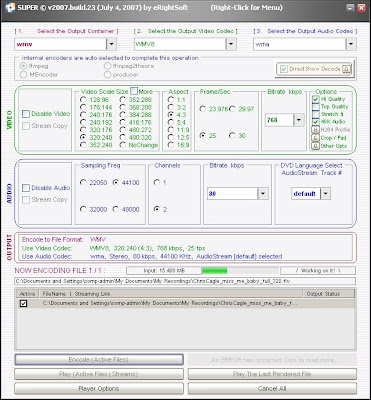


Here we go again. Why yet another media encoder front end? Simple, this GUI allows us to take those FLV flash files and convert them to whatever format we want.

Not really, I wanted WMV which it wouldn't convert for me without generating a error. But who cares. I made a MPEG from a FLV that was nearly perfect and the converstion was insanely simple and fast. It uses a combination of ffmpeg and mplayer codecs to get the job done.

Finding the download link isn't so simple and fast, so here it is.
http://www.erightsoft.net/Superdc.html
From the eRightSoft main page it actually is simple to locate.



A GUI to ffmpeg, MEncoder, mplayer, x264, mppenc, ffmpeg2theora & the theora/vorbis RealProducer plugIn. If you need a simple, yet very efficient tool to convert (encode) or play any Multimedia file, without reading manuals or spending long hours training, then SUPER © is all you need. It is a Multimedia Encoder and a Multimedia Player, easy-to-use with 1 simple click.

Here is the list from the Super site, it almost seems like a bad infomercial:

SUPER © IS UNIVERSAL as it supports a wide variety of input/source file format to playor encode (to & from) without any additional third party software. Supported input source file formats are:

- Video format: 3gp/3g2(Nokia,Siemens,Sony,Ericsson) asf, avi (DivX,H263,H263+,H264,XviD,MPEG4,MSmpeg4 etc..), dat, fli, flc, flv (used in Flash), mkv, mpg (Mpeg I,Mpeg II), mov(H263,H263+,H264,MPEG4 etc..), mp4(H263,H263+,H264,MPEG4), ogg, qt, rm, ram, rmvb, str (Play Station), swf (Flash), ts (HDTV), viv, vob, wmv

- Audio format: aac, ac3, amr, mmf, mp2, mp3, mp4, mpc, ogg, ra, wav, wma- AviSynth Script Files: avs. Let you specify advanced encoding commands using AviSynth scripts!
SUPER © supports the conversion (encoding both ways, to & from ) of ALL the listed formats.

To list few examples:
drag & drop any Audio file or even any VIDEO file and EXTRACT the AUDIO part by converting it toaac, ac3, amr_nb (for ring tones), amr_wb, mmf (for ring tones), mp2, mp3, mpc (MusePack), ogg, wav, wma formats.
* Mobile phone 3GP converter Convert any input video format to 3GP. Convert a 3GP file to any other video format.
* Mobile phone 3G2 converter Convert any input video format to 3G2. Convert a 3G2 file to any other video format.
* PocketPC converter Convert any input video format to a PocketPC file. Convert a PocketPC file to any other video format.
* iPod & iPod 5.5G converter Convert any input video format to an iPod/5.5G file. Convert an iPod/5.5G file to any other video format.The rendered iPod/5.5G files are created using the most advanced video codecs H.264/AVC and MPEG-4 format.To copy a DVD (that you legally purchased) into a valid iPod/5.5G format, we recommend that you also use the bestavailable DVDDecrypter to decrypt the entire DVD and copy the VOB files to your HardDisk in order to encodethem with SUPER ©. Note that DVDDecrypter is also a Freeware.
* PS3 & PSP converter Convert any input video format to a PS3/PSP file. Convert a PS3/PSP file to any other video format.The rendered PS3/PSP files are created using the most advanced video codecs H.264/AVC and MPEG-4 format.To copy a DVD (that you legally purchased) into a valid PS3/PSP format, we recommend that you also use the bestavailable DVDDecrypter to decrypt the entire DVD and copy the VOB files to your HardDisk in order to encodethem with SUPER ©. Note that DVDDecrypter is also a Freeware.
* Zune converter Convert any input video format to a Zune file. Convert a Zune file to any other video format.The rendered Zune files are created using a fully compatible WMV7/8 and WMA format.To copy a DVD (that you legally purchased) into a valid Zune format, we recommend that you also use the bestavailable DVDDecrypter to decrypt the entire DVD and copy the VOB files to your HardDisk in order to encodethem with SUPER ©. Note that DVDDecrypter is also a Freeware.
* Nintendo DS converter Convert any input video format to a Nintendo DS file. (.dpg)The rendered Nintendo DS files are created using a fully compatible DPG format.To copy a DVD (that you legally purchased) into a valid Nintendo DS format, we recommend that you also use the bestavailable DVDDecrypter to decrypt the entire DVD and copy the VOB files to your HardDisk in order to encodethem with SUPER ©. Note that DVDDecrypter is also a Freeware.
* VCD converter Convert any input video format to MPG-VCD. Convert an MPG-VCD file to any other video format.The rendered MPG files are VCD-standard strictly compliant and "NERO burning" compatible. They are seamlesslyaccepted by NERO to burn without any additional process and produce a CD playable on most stand alone players.
* SVCD converter Convert any input video format to MPG-SVCD. Convert an MPG-SVCD file to any other video format.The rendered MPG files are SVCD-standard strictly compliant and "NERO burning" compatible. They are seamlesslyaccepted by NERO to burn without any additional process and produce a CD playable on most stand alone players.
* DVD converter
Convert any input video format to VOB-DVD. Convert a VOB-DVD file to any other video format.The rendered VOB files are DVD-standard strictly compliant and "TMPGEnc DVD Author" compatible. They areseamlessly accepted by the "TMPGEnc DVD Author" which will add the necessary Menu, create theadditional .bup and .ifo files, rename/split the rendered VOB file to Vts_xx_x.vob before burning to DVD.
* AVI converter
Convert any input video format to AVI. Convert an AVI file to any other video format.The rendered AVI files are created using a wide variety of codecs H.264/MPEG-4/DivX/XviD/H.263... togetherwith AAC, ac3, mp3, mp2 or wav audio.
MP4 converter Convert any input video format to MP4. Convert an MP4 file to any other video format.The rendered MP4 files are created using a wide variety of codecs H.264/MPEG-4/DivX/XviD/H.263... togetherwith AAC, AMR, wav audio. They are fully playable on QuickTime7.
* MOV converter Convert any input video format to MOV. Convert a MOV file to any other video format.The rendered MOV files are created using a wide variety of codecs H.264/MPEG-4/DivX/XviD/H.263... togetherwith AAC, AMR, wav audio. They are fully playable on QuickTime7.
* ASF converter Convert any input video format to ASF. Convert an ASF file to any other video format.
* FLV converter Convert any input video format to FLV. Convert an FLV file to any other video format.
* MPG converter Convert any input video format to MPG. Convert an MPG file to any other video format.
* OGG converter Convert any input video format to OGG. Convert an OGG file to any other video format.
* WMV converter Convert any input video format to WMV. Convert a WMV file to any other video format.
* GIF converter Convert any input video format to Animated GIF format.
convert AviSynth script files (.AVS) to any other video format.
convert VCD (.DAT) files to any other format. (Also with Lossless Direct Conversion to MPG VCD-Compliant )
* convert Flash (.FLV) files (similar to Google/YouTube video) to any other format.
* convert Matroska (.MKV) files to any other format.
* convert QuickTime (.QT) files to any other format.
* convert RealMedia (.RM .RAM .RMVB .RA) files to any other format.
* convert Old.Play.Station (.STR) files to any other format.
* convert ShockWave Flash (.SWF) files containing FLV video codec to any other format.
* convert HDTV (.TS) files to any other format. (Also with Lossless Direct Conversion To VOB)
* convert VivoActive (.VIV) files to any other format.
* AutoMode to convert any type of video to VCD, SVCD, DVD.
* "Direct Stream Copy" mode to render exact quality when the same video/audio codecs of the source file are to be used in the output file.
* Play all of the above file formats with SUPER ©
* Play or Save on your Disk the Internet Media Streams like: mms:// rtsp:// http://
* Play Images (bmp, dib, fax, jpg, png, rle, tif, wmf) using Win2K/XP Microsoft(R) resources.