http://www.tomshardware.com/reviews/crossfire-pci-express,2095.html
I don't have any revelations about this. What I can tell you is there is about a 5% performance loss with x8/x8. However there is a rule of thumb that might work.
As you increase the graphics processing requirements such as higher resolutions usually above 1600 x 1200 or as you turn up the shader and AA as your FPS drops the gap between x8 and x16 will grow larger. Now understand this is with both cards running at x8 or both at x16. A single card of the same model will never out pace a crossfire setup.
If your above 60fps on x16 you won't see much change. You might see 58fps on x8
At 50fps you will see about 45fps on x8. At 40fps you will see about 25fps at x8.
So this basically tells us the harder the cards work the bigger the gap. If you aren't pushing the limits of the cards you will likely only see your best performance gains with crossfire at very high resolutions.
Showing posts with label video. Show all posts
Showing posts with label video. Show all posts
Wednesday, June 23, 2010

Wednesday, December 16, 2009
One Giant Leap
So you need to get that HD video from your new camera into a format people can use?
Even though the logo looks more like a fox, they are both scavengers and so are we so here it is free of charge. They have many other great tools that I have written about in the past like FLV player. They have a good wmv and mp3 converter as well.

Size: 3.46 MB
-----------------------------------------------------
Free Mp3 Wma Converter V1.9
Even though the logo looks more like a fox, they are both scavengers and so are we so here it is free of charge. They have many other great tools that I have written about in the past like FLV player. They have a good wmv and mp3 converter as well.
http://www.koyotesoft.com/indexEn.html
Free HD Converter V1.4Free HD Converter is a freeware designed to convert all your MTS and M2TS files. AVCHD is a format for the recording and playback of high definition video. Video compressed in MPEG-4 AVC/H.264 format. This format is used by camcorders like Canon HF10, HG20, Sony HDR-SR1, HDR-XR100 and many more.
This freeware will let you convert your HD files from your camcorder easily to AVI, MPEG2, DVD format, Ipod, Mp4, Wmv format. Very fast conversion and completely free to use.
- Batch conversion,
- output video parameters configuration and presets,
- Preview during conversion,
- Fast conversion process and easy to use.
Freeware
Compatibility: Windows 2000/XP/2003/Vista/SevenSize: 3.46 MB
Free Mp3 Wma Converter V1.9
Free MP3 WMA Converter enables you to convert your MP3, WMA, OGG, AAC, M4a, MP4, Ape, Ac3, FLAC, WAVE files:
- Mp3 to Ogg, Mp3 to Wma, Mp3 to AAC, Mp3 to Wav...
- Wav to Mp3, Wav to Ogg, Wav to AAC, Wav to Wma...
- Wma to Mp3, Wma to Ogg, Wma to AAC, Wma to Wav...
- Ogg to Mp3, Ogg to Wma, Ogg to AAC, Ogg to Wav...
- AAC to Mp3, AAC to Wma, AAC to Ogg, AAC to Wav...
- Ape to Mp3, Ape to Wma, Ape to Ogg, Ape to Wav...
- Flac to Mp3, Flac to Wma, Flac to Ogg, Flac to Wav...
- M4a to Mp3, M4a to Wma, M4a to Ogg, M4a to Wav...
- Ac3 to Mp3, Ac3 to Wma, Ac3 to Ogg, Ac3 to Wav....
And even more possible conversions !
You can convert Itunes audio files (m4a format) free of charge in MP3, WMA, OGG…! Tags's editor integrated (V1 and V2). Copy your audio CDs very rapidly thanks to “Free CD Ripper”. Simplicity at the service of efficiency.
For a full list of products
Tuesday, March 3, 2009
Smoke and Mirrors - 4870 vs 4850
Comparing the 4850 vs the 4870, which card is best for you.
If you look at the stream processors you see 800 for both cards. So you begin to ask yourself what am I paying 50% or more for?Lets look at some NewEgg specs:
GIGABYTE GV-R485OC-1GH Radeon HD 4850 1GB 256-bit GDDR3 PCI Express 2.0 x16 HDCP Ready CrossFire Supported Video Card - Retail
- Chipset Manufacturer: ATI
- Core clock: 700MHz
- Stream Processors: 800 Stream Processing Units
- Memory Clock: 1920MHz
- DirectX: DirectX 10.1
- OpenGL: OpenGL 2.1
- HDMI: 1 via Adapter
- DVI: 2
- Model #: GV-R485OC-1GH
GIGABYTE GV-R487D5-1GD Radeon HD 4870 1GB 256-bit GDDR5 PCI Express 2.0 x16 HDCP Ready CrossFire Supported Video Card - Retail
- Chipset Manufacturer: ATI
- Core clock: 750MHz
- Stream Processors: 800 Stream Processing Units
- Memory Clock: 3600MHz
- DirectX: DirectX 10.1
- OpenGL: OpenGL 2.1
- HDMI: 1
- DisplayPort: 1
- Model #: GV-R487D5-1GD
Finally we have to consider the power consumption which translates into heat. Can your case handle the extra heat? Is the 12v rail on your power supply rated to match the power consumption of the card. I recommend 25amps on that rail minimum. If your using 2 separate rails you can add them together. The 4870 uses much more power to operate.
If you're looking for stability (MMO gaming for example) you're going to want to go with the 4850.
If you're looking to get a bit more performance then pay the extra money but in most cases you will never see the difference even at higher resolutions. If you wanted to get the best of both worlds you might be able to put together a 4850 x2 crossfire system for slightly more than a 4870 but you will see huge performance gains by comparison.
Tuesday, April 29, 2008
Home Grown TV
More and more people are overcoming the controls placed on them by big media companies. They are producing unique focused content that likely won't make them famous but certainly can cause a following. They are opening more doors than just sitting at home playing an odds game. This is reality TV. Made by real people not mass media companies. Your looking at the next generation of media pioneers. If you enjoy their work donate anything to help them grow. Their success will pave the road for many more future success stories.


http://theguild.blip.tv/posts?view=archive&nsfw=dc - better quality than Youtube
http://www.watchtheguild.com/


http://theguild.blip.tv/posts?view=archive&nsfw=dc - better quality than Youtube
http://www.watchtheguild.com/


The Guild on The Web
IMDB
Wikipedia
MySpace
Facebook Fan Page
Core Facts about The Guild
- Over 6 million hits web-wide
- Completely funded by Fan Paypal donations since episode 3
- Almost 1/2 of our donors are women
- The 10th episode will be the Season 1 Finale
Tuesday, March 11, 2008
So what does a Berkeley dropout do?

I was going to write a program to replace FRAPS. This guy did just that and its free. This isn't rocket science but it is computer science. No spyware, no ads, no time limits. The utility also lets you record and post at the the same time. They claim great performance. From everything I see up front I think this is a job well done and is going in my hotpics list.


Wednesday, January 9, 2008
Not Too Rich for My Blood

http://www.any-video-converter.com/products/for_video_free/
I was trying to convert wmv to avi for a video contest my kids were trying to enter. I was unable to find a free program that could make this happen without crashing or butchering my video. Here is a free solution. The pay for versions have a direct from DVD conversion option. I haven't used this feature so you may want to stick with Intervideo and DVDXCopy XPRESS
which I have recommended in the past.
This is a free video format conversion utility with a feature rich interface. I have posted about other utilities that do what this can do and more. This interface has a much more commercial look and feel.
Any Video Converter is a professional video converter which can convert video files from various formats with fast converting speed and excellent video quality . It can convert almost all video formats including DivX, XviD, MOV, rm, rmvb, MPEG, VOB, DVD, WMV, AVI to MPEG-4 movie format for iPod/PSP or other portable video device, MP4 player or smart phone. It also supports any user defined video file formats as the output. It has an unmatchable speed and high quality. Any Video Converter makes it easy for anyone to enjoy the any format video with your iPod, PSP, mobile phone or MP4 player.

Tuesday, January 8, 2008
Bundys on Joost ... I'm almost happy

http://www.joost.com/
What's Joost?
It's video – more than 20,000 shows, with more added daily.
It's online – all you need is a broadband internet connection.
And it's free. So what are you waiting for?
Peg: Al, I want sex.
Al: Well, so do I. But I don't see the need to bring you into it.

Friday, January 4, 2008
Record any Sweet Jumps
Oregon Scientific
ATC2K Waterproof Action Cam

When your part of the action you need a camera that can be too.


So your kids break everything you buy them? Here is a low priced Digital Video Recorder that was designed for that sports star trying to capture that perfect moment. They say a picture is worth 1000 words. Well the videos your kids bring home with this camera will leave you speechless and leave them grounded.
Look at the arms on that guy... they are like cannons!

We can't all be pros. Likewise this camera wasn't designed for professional use.

It has low 640 x 480 resolution. However its perfect for space saving when recording to a SD card.
You can capture that football game or dance recital but the videos your kids bring home will be about who they are and how they live. These are not just memories lost, but memories you never had a chance to capture. For $130 it comes with a 2gb SD card so it will make the right gift for a teen who has just about everything else.
http://www.atc2k.com/
ATC2K
Full-function, hands-free, digital recording
Waterproof up to 3 meters and shock-resistant for extreme conditions
Mounts easily on helmets, handlebars, and other sports equipment
640 x 480 VGA resolution at 30 frames per second
USB and RCA cables included for easy playback on PC or TV (NTSC)
SD card expansion up to 2GB – onboard memory is 32MB
Operates with 2 AA batteries, not included
Dimensions: 4.25L x 1.75D x 2.25H (in.)
GeekGirl Show 40 product review
ATC2K Waterproof Action Cam

When your part of the action you need a camera that can be too.


So your kids break everything you buy them? Here is a low priced Digital Video Recorder that was designed for that sports star trying to capture that perfect moment. They say a picture is worth 1000 words. Well the videos your kids bring home with this camera will leave you speechless and leave them grounded.
Look at the arms on that guy... they are like cannons!

We can't all be pros. Likewise this camera wasn't designed for professional use.

It has low 640 x 480 resolution. However its perfect for space saving when recording to a SD card.
You can capture that football game or dance recital but the videos your kids bring home will be about who they are and how they live. These are not just memories lost, but memories you never had a chance to capture. For $130 it comes with a 2gb SD card so it will make the right gift for a teen who has just about everything else.
http://www.atc2k.com/
ATC2K
Full-function, hands-free, digital recording
Waterproof up to 3 meters and shock-resistant for extreme conditions
Mounts easily on helmets, handlebars, and other sports equipment
640 x 480 VGA resolution at 30 frames per second
USB and RCA cables included for easy playback on PC or TV (NTSC)
SD card expansion up to 2GB – onboard memory is 32MB
Operates with 2 AA batteries, not included
Dimensions: 4.25L x 1.75D x 2.25H (in.)
GeekGirl Show 40 product review
Thursday, December 20, 2007
So Your a Player, BetaPlayer is for Real
This is part 1 of a 3 part article.
The next two parts were posted in reverse order so you can read from top to bottom.
BetaPlayer, when all else fails. But get it while it lasts, it may not be free for long.
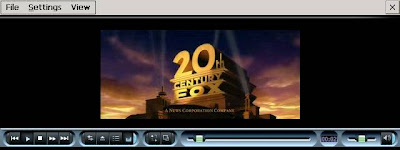
On my Dell Axim x50v BetaPlayer is the only player I use. It can play just about anything with ease. I can run a full blown DVD .vob smoothly without a snag. There is a video accelerator from my last article that can speed up performance but may not be needed since the latest Dell patch.
BetaPlayer (now known as TCPMP)
Version: 0.71
Author: Gábor Kovács
Home Page: http://tcpmp.corecodec.org/about - Site down, so download here
Type: Freeware - $0
Description: DivX Player for video and audio that can play DivX, AVI, OGG, OGM, WAV, MP1, MP2, MP3 formats. Install it, then install GAPI for HPC's.
Part 2 - GAPI for Handheld PC
Part 3 - DVD to Pocket PC or Just to Archive for FREE
The next two parts were posted in reverse order so you can read from top to bottom.
BetaPlayer, when all else fails. But get it while it lasts, it may not be free for long.
On my Dell Axim x50v BetaPlayer is the only player I use. It can play just about anything with ease. I can run a full blown DVD .vob smoothly without a snag. There is a video accelerator from my last article that can speed up performance but may not be needed since the latest Dell patch.
BetaPlayer (now known as TCPMP)
Version: 0.71
Author: Gábor Kovács
Home Page: http://tcpmp.corecodec.org/about - Site down, so download here
Type: Freeware - $0
Description: DivX Player for video and audio that can play DivX, AVI, OGG, OGM, WAV, MP1, MP2, MP3 formats. Install it, then install GAPI for HPC's.
Part 2 - GAPI for Handheld PC
Part 3 - DVD to Pocket PC or Just to Archive for FREE
From Cradle to Grave
DVD to Pocket PC or Just to Archive for FREE
FREE process to take a DVD that you purchased and rip it to a DivX or Xvid format
BEFORE starting:
* The latest and proper-for-your-machine DivX and XviD codecs
* A copy of FAIR USE LE (free)
* A copy of BetaPlayer
For pocket PC users you may want to have direct video memory access for smoother performance: GAPI for Handheld PC’s
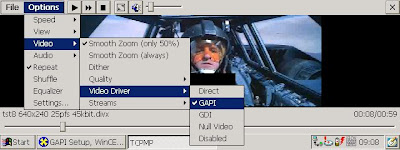
Put the DVD into your DVD drive
Launch Fair Use LE
In the FINAL FILE SIZE box enter the output size of the movie. The bigger the better but keep in mind that you may need to fit it on your portable device.
Choose to encode in either XviD or DivX format
Click FULL AUTO MODE at the bottom left
Click NEXT at the bottom right
Click the CREATE NEW PROJECT radio option and name the output file and where it will be created.
This is a 1 to 3 hour process depending on the performance of your PC
This movie will now play on your PDA using BetaPlayer.
Part 1 - BetaPlayer
Part 2 - video acceleration (pedal to the metal)

FREE process to take a DVD that you purchased and rip it to a DivX or Xvid format
BEFORE starting:
* The latest and proper-for-your-machine DivX and XviD codecs
* A copy of FAIR USE LE (free)
* A copy of BetaPlayer
For pocket PC users you may want to have direct video memory access for smoother performance: GAPI for Handheld PC’s
Put the DVD into your DVD drive
Launch Fair Use LE
In the FINAL FILE SIZE box enter the output size of the movie. The bigger the better but keep in mind that you may need to fit it on your portable device.
Choose to encode in either XviD or DivX format
Click FULL AUTO MODE at the bottom left
Click NEXT at the bottom right
Click the CREATE NEW PROJECT radio option and name the output file and where it will be created.
This is a 1 to 3 hour process depending on the performance of your PC
This movie will now play on your PDA using BetaPlayer.
Part 1 - BetaPlayer
Part 2 - video acceleration (pedal to the metal)
Saturday, December 8, 2007
Wimpy Yes, Flashy No - Free FLV players
Flash Movie Player (FREE)
http://www.eolsoft.com/freeware/flash_movie_player/

http://www.eolsoft.com/freeware/flash_movie_player/

*Flash Movie Player is absolutely free - no nag screens, no ads, no spyware, no time limit.
*Allows to rewind swf movies, animations and Flash games to any position in playing or paused mode.
*Opens exe projector files from version 4 to version 7 and works with them same way as with ordinary SWF files (allows rewinding, etc.)
*Flash Movie Player can extract flash movies from exe projector files and save them in SWF format.
*Supports Playlists. Playlist entry editor, sorting functions.
*Has full screen mode with auto-hiding navigation bar.
*All other Macromedia Flash Player standard features (zoom, quality select, repeat, scale mode select).
*Snapshots creation : allows to create snapshot of any animation's frame and save the image in Jpeg or Bmp format.
*Hotkeys for all frequent operations.
*Has Drag-n-drop support.
*The executable has small size and low system requirements.
*Multilingual interface. (32 Languages supported at the moment).
*Allows to explore cached SWF files. (Add swf files from IE, Firefox and Opera cache to playlist).
*Can act as Screensaver. You can set up Flash Movie Player as your screensaver to play flash animations while computer is in idle.
________________________________
Wimpy Desktop FLV Player (FREE) http://www.wimpyplayer.com/products/wimpy_standalone_flv_player.html
Play FLV - Flash formated files on a PC or Mac
_____________________________________
FLV Player
http://www.martijndevisser.com/blog/flv-player/
FLV Player is a standalone utility to play Adobe Flash Video (FLV) files with. FLV Player is compatible with Windows 2000, XP and Vista. FLV Player supports both local and internet streaming content, has fullscreen mode and, best of all, it is free.
___________________________________
http://www.globfx.com/products/swfplayer/
Thursday, December 6, 2007
No Fuss, No Muss, or should I say mess.
(potentially not work safe!!!)

http://www.videocodezone.com/
(potentially not work safe!!!)
Online Tools Convert And Download Your Favorite Videos (For Free!!!)
VideoCodeZone and other similiar services (some listed below) work by entering a URL for the FLASH or MEDIA or browsing to a file on you PC. Then like your toaster you simply push the button and wait. Some of these services notify you by email when they are done with the conversion process.
Home Video Conversion and Download
Convert and download videos from popular websites without installing any software.
These services allows you to download and convert videos to many popular formats available today. Some of these sites also allow you to browse videos converted by other which could be in conflict with your employers code of conduct.
This is a online flash video converter where you copy and paste the URL of the video, select the output format and click the Convert/Download button.
You can also convert any flash video from your own files as well. Select the file and click the Convert/Download button.
Other sites:
http://online.movavi.com/
http://vixy.net/
http://www.flvix.com/ - not work safe
http://media-convert.com/
http://www.zamzar.com/
http://www.all2convert.com/index.html - choose your poison (very simple interface)
http://www.videocodezone.com/
(potentially not work safe!!!)
Online Tools Convert And Download Your Favorite Videos (For Free!!!)
VideoCodeZone and other similiar services (some listed below) work by entering a URL for the FLASH or MEDIA or browsing to a file on you PC. Then like your toaster you simply push the button and wait. Some of these services notify you by email when they are done with the conversion process.
Home Video Conversion and Download
Convert and download videos from popular websites without installing any software.
These services allows you to download and convert videos to many popular formats available today. Some of these sites also allow you to browse videos converted by other which could be in conflict with your employers code of conduct.
This is a online flash video converter where you copy and paste the URL of the video, select the output format and click the Convert/Download button.
You can also convert any flash video from your own files as well. Select the file and click the Convert/Download button.
Other sites:
http://online.movavi.com/
http://vixy.net/
http://www.flvix.com/ - not work safe
http://media-convert.com/
http://www.zamzar.com/
http://www.all2convert.com/index.html - choose your poison (very simple interface)
 |  |  |  |  |
http://heywatch.com/page/home - registration required (supports Adobe Flash 9 H.264)
Tuesday, November 27, 2007
Baby Steps - A simpler way to convert video for portable devices

Videora Converter - FREE (no skill required)
http://www.videora.com/en-us/Converter/
"It allows you to convert your regular PC video files (avi, mpeg, etc) into the proper video format that your mobile or fixed video device understands. Each version is tailored specifically to the device in question."

This is a suite of applications specifically tuned to the device you want to create video for. So there is a seperate download for each application depending on your device.
This covers the IPOD, IPhone, PSP, XBox 360, Tivo, and PMP.
http://www.videora.com/en-us/Converter/
"It allows you to convert your regular PC video files (avi, mpeg, etc) into the proper video format that your mobile or fixed video device understands. Each version is tailored specifically to the device in question."

This is a suite of applications specifically tuned to the device you want to create video for. So there is a seperate download for each application depending on your device.
This covers the IPOD, IPhone, PSP, XBox 360, Tivo, and PMP.

For more advanced options and in many cases better quality results, check out my post for MPLAYER and the MeWiG GUI (some PC skill required)
http://thinkbiggar.blogspot.com/2007/10/get-it-while-it-lasts-powerful-media.html
Monday, November 19, 2007
Life comes full circle - ORB personal media broadcasting - FREE

Broadcast your movies, TV, and other media content anywhere for FREE.
What VLC does ORB does well and is easy to setup. ORB is dependent on a Streaming media source to make it work.
The Orb application is free. There are no fees for MyCasting. You need a home pc to get setup, and can use any web-enabled media player with streaming capabilities to remotely play the media. VLC is a good start.
Your computer broadcasts the media you choose that is stored on your PC. You can stream content through any internet device. This works with mobile phones, PDAs, laptops or any other computer.
There is no software installation required on the receiving web device. You can broadcast photos, music, videos, and even live TV. You can use this to view documents as well.
ORB instructions and recommendations.
Download:
http://corp.orb.com/download_orb
Friday, November 16, 2007
Get Down with Download Manager
DownloadHelper
http://www.downloadhelper.net/index.php
DownloadHelper is a free Firefox extension for downloading flash videos and images from many sites with minimum effort.
You can save videos from sites where there is no option to download the movie to your hard disk. DownloadHelper works on YouTube, MySpace, Google videos, DailyMotion, Porkolt, iFilm, DreamHost and many others: check here for a longer list of supported sites.
It is also possible to capture all the images from a gallery in a single operation.
Play your newly captured flash file with mplayer or IrfanView.
Here is a post with stand alone FLV players:
http://thinkbiggar.blogspot.com/2007/12/wimpy-yes-flashy-no-free-flv-players.html
http://www.downloadhelper.net/index.php
DownloadHelper is a free Firefox extension for downloading flash videos and images from many sites with minimum effort.
You can save videos from sites where there is no option to download the movie to your hard disk. DownloadHelper works on YouTube, MySpace, Google videos, DailyMotion, Porkolt, iFilm, DreamHost and many others: check here for a longer list of supported sites.
It is also possible to capture all the images from a gallery in a single operation.
Play your newly captured flash file with mplayer or IrfanView.
Here is a post with stand alone FLV players:
http://thinkbiggar.blogspot.com/2007/12/wimpy-yes-flashy-no-free-flv-players.html
Monday, November 12, 2007
Free iPod Video Converter

http://www.ipod-video-converter.org/
Free iPod Video Converter provides an easy and completed way to convert all popular video formats to iPod video.
Supports DVD/VCD and AVI, MPEG, WMV, RM, RMVB, DivX, ASF, VOB video files to your iPod with few clicks. The program is a freeware and does not contain any form of malware, including but not limited to: spyware, viruses, trojans and backdoors.
Wednesday, October 24, 2007
A digital leap for TV...
...they just should have looked first...
Many stations out there now have begun to cut out the middle man of torrents and other P2P applications and have started a new trend of just putting their shows on the net themselves.
I would like to say first and foremost, that this is an excellent idea, and I commend each and every television station contributing to this effort.
Now, as we all know, television is a business. The net is just another branch that those businesses have started to reach out to. And what is business without a little competition to keep it advancing? As a result we have many variations of essentially the same product out there now. I feel it is my job to let not only you, the consumer, know which is best, but also to inform the companies of what they are lacking, as well as encourage them to continue bettering their products and services. Due to the fact that not everybody has cable or satellite, I will just be mentioning the broadcast station web-TV sites for this post.
So here is your ThinkingBiggar review of "Web-TV":
First off we have CBS. It is first for two reason. #1, it is the lowest channel on my TV, and #2 they have unmatched web-TV.
Pros:

Next up we have ABC. ABC's player is rather easy to use, and why they do get a point for style, I have to take that same point right back for sheer annoyance.
Pros:
Now we come to NBC. While NBC has some of my favorite shows around, they could use some work in their web-player department. Not much mind, you, but some.
Pros:
they would get 4 if they would stop the commercials from exiting out of full screen mode
The CW... This one just flat out hurts to look at, let alone use. Don't get me wrong, the CW has some great features, but the player itself does a number on their score.
Pros:
It is sad though, because The CW's sister station MyNetworkTV has a rather amazing player, yet no real content. So unfortunately they get no Happy Thoughts today.
Now Should The CW adopt MyNetworkTV's player, they could boost their score considerably.
Finally, Fox. Fox gets the job done with a degree of style, but not so much as it gets in the way.
Pros:
So an overview,
CBS-
ABC-
NBC-
CW-
MyNetworkTV-
Fox-
Many stations out there now have begun to cut out the middle man of torrents and other P2P applications and have started a new trend of just putting their shows on the net themselves.
I would like to say first and foremost, that this is an excellent idea, and I commend each and every television station contributing to this effort.
Now, as we all know, television is a business. The net is just another branch that those businesses have started to reach out to. And what is business without a little competition to keep it advancing? As a result we have many variations of essentially the same product out there now. I feel it is my job to let not only you, the consumer, know which is best, but also to inform the companies of what they are lacking, as well as encourage them to continue bettering their products and services. Due to the fact that not everybody has cable or satellite, I will just be mentioning the broadcast station web-TV sites for this post.
So here is your ThinkingBiggar review of "Web-TV":
First off we have CBS. It is first for two reason. #1, it is the lowest channel on my TV, and #2 they have unmatched web-TV.
Pros:
- The most complete collection of shows
- Easy to navigate display
- Original content
- True full screen display
- commercials are far less obtrusive than the other sites
- Video search function
- The only real con is that the audio control is not a slider, but hey, I crank that sucker up to full anyways
- aside from that, I have experienced some problems when I go to play a new episode of a show.

Next up we have ABC. ABC's player is rather easy to use, and why they do get a point for style, I have to take that same point right back for sheer annoyance.
Pros:
- Sleek and good looking
- Original content
- Search bar
- Fair amount of shows available online
- Mini video mode - I personally don't know why you would want it smaller but if you do, there you go
- SLOW, it is slow to load, the navigation is slow, I mean by the time I get to a show I want to watch i am already bored of ABC's player
- Also no audio control is rather frustrating
Now we come to NBC. While NBC has some of my favorite shows around, they could use some work in their web-player department. Not much mind, you, but some.
Pros:
- Original Content
- Moderately full list of shows
- Easy to navigate
- Full Screen-ish
- You are taken out of full screen during each commercial
- Full screen is really just large with the window removed
- Switching between different shows is more of a hassle than the other players
they would get 4 if they would stop the commercials from exiting out of full screen modeThe CW... This one just flat out hurts to look at, let alone use. Don't get me wrong, the CW has some great features, but the player itself does a number on their score.
Pros:
- Ample original content
- fair number of shows
- easy to navigate
- they run an RSS feed
- Commercials pull you back down to the small player screen, making watching a pain, severely dropping their score
It is sad though, because The CW's sister station MyNetworkTV has a rather amazing player, yet no real content. So unfortunately they get no Happy Thoughts today.
Now Should The CW adopt MyNetworkTV's player, they could boost their score considerably.
Finally, Fox. Fox gets the job done with a degree of style, but not so much as it gets in the way.
Pros:
- Easy to navigate
- Easy to select new shows
- Enough shows where you won't get bored
- BETA- that is right folks, FOX's player is just in beta right now which means they are still looking to improve it
- Short commercials
- Lacking in original content
- No quick select for full screen
- Lacking true full screen
So an overview,
CBS-
ABC-
NBC-
CW-
MyNetworkTV-
Fox-
Subscribe to:
Posts (Atom)


 VGA Charts
 Blog Feed